Skip to content

Blog

Building Thread border router with an Espressif development kit

These are my notes for setting up a Thread border router based on the OpenThread stack using the Espressif Thread Border Router development board. This board is a weird little guy, with an ESP32-S3 and an ESP32-H2 grafted together on one board bridged by UART/SPI. The idea is that the S3 functions as the host and lives on your WiFi network (or Ethernet, if you buy the daughter board), and the H2 runs Zigbee or Thread and talks to the S3. It costs about $10 shipped. You can actually get the price even lower by plugging an ESP32-H2 directly into your Home Assistant host by USB-C and running the border router stack on the host. But, I think Espressif's dev board gives you the good parts of a stand-alone border router with a completely self-hosted, open source stack and zero ties to anyone's cloud service. As a smart person once advised me, let network stuff do network stuff, and let server stuff do server stuff; networking infrastructure should fade into the background and should be upgraded or replaced very, very rarely.

I paid 1,326円 to get mine from AliExpress.

It took me a couple of hours to get everything working, which could have gone a lot more smoothly if I'd been a little bit more methodical and a little less excited. These notes detail exactly what I did to get Matter over Thread working in Home Assistant running in a Docker container on my little home server, which runs Debian. I've removed all of my mistakes, swearing and confusion. If you're interested in replicating this setup, these notes should give you a straight shot from opening the box to commissioning your first Matter device in Home Assistant.


Prerequisites

You'll need this hardware :

  • Espressif ESP Thread Border Router board (ESP32-S3 + ESP32-H2)
  • Linux host running Home Assistant container and Matter server container
  • A WiFi network
  • An Android of iOS device running the Home Assistant companion app
  • A Matter device to test with

You'll also need these repos :


Part 1: Building and Flashing the Firmware

1.1 Install esp-idf v5.5.4

The esp-thread-br project requires esp-idf v5.5.4. The 6.x series has API changes that break the build. This will require about 3.8 GB after everything is downloaded and built.

git clone -b v5.5.4 --recursive https://github.com/espressif/esp-idf.git esp-idf-v5.5.4
cd esp-idf-v5.5.4
./install.sh
. ./export.sh

Note the leading . when sourcing export.sh. This script needs to be sourced, not just executed. Add an alias to your shell config for convenience :

alias get_idf='. ~/path/to/esp-idf-v5.5.4/export.sh'

You must source export.sh in every new terminal session before building.

1.2 Build the RCP firmware

The RCP (Radio Co-Processor) firmware runs on the ESP32-H2. It must be built before the main border router firmware, as it gets bundled in and flashed to the H2 automatically on first boot. Think of this as the "baseband" for this device, if you like.

cd esp-idf-v5.5.4/examples/openthread/ot_rcp
idf.py set-target esp32h2
idf.py build

1.3 Clone esp-thread-br

This is the firmware for the ESP32-S3, which is what we'll actually be interacting with. This repo will take up about 1.2 GB once everything is downloaded and built.

git clone --recursive https://github.com/espressif/esp-thread-br.git
cd esp-thread-br/examples/basic_thread_border_router

Use the basic_thread_border_router example. The ot_br example from esp-idf is a simpler standalone example without the full partition table (OTA, rcp_fw) we need for this board.

1.4 Configure

idf.py set-target esp32s3
idf.py menuconfig

Key settings to configure. It's kind of amazing how capable the ESP32 platform is, and so I think it is pretty interesting to explore the features in the menuconfig TUI. It is a bit overwhelming though, so you can also use / to search each symbol by name) :

Symbol Setting
EXAMPLE_WIFI_SSID Your WiFi network name
EXAMPLE_WIFI_PASSWORD Your WiFi password
OPENTHREAD_BR_AUTO_START Enable
OPENTHREAD_BR_START_WEB Enable (web UI)
ESPTOOLPY_FLASHSIZE 8MB
OPENTHREAD_CLI_WIFI Disable (conflicts with auto-start)
OPENTHREAD_CSL Disable (causes linker errors)
OPENTHREAD_MAC_FILTER Enable (recommended for security)
OPENTHREAD_DIAG Consider disabling for production

There are various ways to get your WiFi credentials set up, but unfortunately there are some compile-time conflicts. The path of least resistance is just to bake them into your firmware image.

1.5 Build and flash

The board has two USB-C ports. One is for the ESP32-S3 (host), and one for the ESP32-H2 (RCP). Flash the main firmware via the S3 port :

idf.py build flash monitor

The H2 will be flashed automatically from the bundled RCP firmware on first boot. If you see RCP-related crashes, flash it manually via the H2 port :

cd esp-idf-v5.5.4/examples/openthread/ot_rcp
idf.py -p <H2_port> flash

To exit the monitor: Ctrl+]


Part 2: Configuring the Thread Network

If you built the web admin interface into your firmware, you can see a lot of cool diagnostic information. However, I found that some key settings do not actually stick if you enter them by the web admin interface, and it will sometimes show the default values for things like the network name even if you've set them correctly. Treat information reported by the console interface as the actual truth.

2.1 Verify the border router is up

Now that the board is flashed and booted, we'll have to configure it. Connect to the ESP32-S3 console and check the Thread state :

ot state

If it shows disabled, bring the interface up :

ot ifconfig up
ot thread start

Wait a few seconds. It should transition to leader.

2.2 Generate a fresh dataset

The default dataset ships with dummy values that must be replaced :

ot dataset init new
ot dataset networkname <your-network-name>
ot dataset commit active
ot thread stop
ot thread start

Verify the new dataset :

ot dataset active

Confirm the network key is not 00112233445566778899aabbccddeeff and PAN ID is not 0x1234.

2.3 Useful CLI commands for monitoring

ot neighbor table           # see connected Thread devices
ot router table             # see Thread routers
ot netdata show             # see advertised prefixes and services
ot srp-server host list     # see registered SRP hosts
ot srp-server service list  # see registered services

Part 3: Home Assistant Integration

3.1 Install required integrations

In Home Assistant, install :

  • Matter integration
  • Thread integration
  • OpenThread Border Router integration

There are a couple of ways to set this up, but I'm running the The Open Home Foundation Matter Server in a Docker container.

3.2 Add the border router

In Home Assistant, go to Settings → Devices & Services → Add Integration → OpenThread Border Router, enter :

http://<border-router-ip>:80

Or, it's probably more likely that Home Assistant will see that there's a Thread Border Router advertising itself on your network and offer to set it up. Once you've added the border router, go to the Thread integration → Configure and set the ESP border router as the preferred network.

3.3 Sync Thread credentials to your phone

Before commissioning any Matter devices, sync the Thread credentials to your phone via the Home Assistant Companion app :

Android: Settings → Companion app → Troubleshooting → Sync Thread credentials

This step is important! Without it, Matter commissioning will fail with a misleading "your device requires a Thread border router" error even though the border router is working correctly. You only have to do this once, though.


Part 4: IPv6 Routing on the Linux Host

This was actually the most troublesome part of the whole process. The Matter server needs IPv6 connectivity to the Thread network prefix in order to commission devices. But, Matter is running in a Docker container, and it's fairly unlikely that the network plumbing is set up correctly to allow the container to hear IPv6 Router Advertisements on the host's physical network port. By default, Linux ignores Route Info Options in Router Advertisements when IPv6 forwarding is enabled, which prevents the Thread prefix route from being installed.

So, we'll have to re-plumb things for IPv6 a little bit.

4.1 Verify the problem

Check if the Thread prefix route is present :

ip -6 route | grep <thread-prefix>

You should able to see your border routers's IPv6 prefix in the ESP32 console messages, or by running ot netdata show.

If it's missing, check what RAs are arriving :

sudo tcpdump -i enp1s0 -vv icmp6 and ip6[40] == 134

You should see RAs from the border router advertising the Thread prefix as a route info option.

4.2 Fix: accept Route Info Options

Linux requires accept_ra_rt_info_max_plen to be set to a non-zero value to process route info options from RAs. Also, accept_ra=2 is needed when IPv6 forwarding is enabled (which Docker enables).

To apply immediately :

sudo sysctl net.ipv6.conf.enp1s0.accept_ra=2
sudo sysctl net.ipv6.conf.enp1s0.accept_ra_rt_info_max_plen=64

Replace enp1s0 with your actual Ethernet interface name.

4.3 Make permanent

To make these settings stick, create or edit /etc/sysctl.d/ipv6.conf:

net.ipv6.conf.enp1s0.accept_ra=2
net.ipv6.conf.enp1s0.accept_ra_rt_info_max_plen=64

Apply :

sudo sysctl --system

4.4 Verify

After the next RA cycle (up to ~2 minutes), the route should appear :

ip -6 route | grep <thread-prefix>

You should also be able to ping Thread devices directly from the Home Assistant host and from inside the Matter container :

ping -6 -c 3 <thread-device-ipv6>

4.5 Matter server container networking

The Matter server container must use host networking to access the Thread IPv6 prefix. Bridge networking will not work. Ensure your compose file has :

network_mode: host

With no ports: mappings (this is not needed with host networking).


Troubleshooting

Instead of relating all of my screwups in narrative form, please use this table to learn from my mistakes.

Symptom Likely cause
Reboot loop, RCP capabilities error H2 not flashed or wrong firmware version
Build fails with esp_ot_wifi_* undefined Using esp-idf 6.x instead of 5.5.4
Build fails with OPENTHREAD_CLI_WIFI conflict Disable OPENTHREAD_CLI_WIFI in menuconfig
Linker errors for otPlatRadioEnableCsl Disable OPENTHREAD_CSL in menuconfig
"Your device requires a Thread border router" Phone Thread credentials not synced, sync via Companion app, see Part 3.3
Matter commissioning fails, "Network is unreachable" IPv6 routing not configured on host, see Part 4
Thread prefix route not appearing despite RAs arriving accept_ra_rt_info_max_plen=0, see Part 4.2
Border router on WiFi, host on Ethernet, no route Normal, solved by sysctl settings, not a bridge/AP issue

The NCLDV core genes, revisited

Article available as a Jupyter Notebook: NCLDV-core-genes.ipynb

Morgan Gaia from Genoscope delivered a pair of very interesting seminars for our institute and laboratory this week on the question of eukaryogenesis. One way or another, Morgan has been working on the question of the origin of the eukaryotes since he was a Ph.D. student, and spoke, presented and fielded questions on the topic from 10 AM to late into the evening without repeating himself or collapsing from jetlag and exhaustion. He is visiting our laboratory in Kyoto for a few weeks, so I thought this would be a good opportunity to take SuchTree out for a spin on a new class of problem now that it's finally reached its 1.0 release.

In his previous life as a postdoc at the Pasteur Institute, Morgan and his colleagues published an analysis of eight core genes of the NCLDV lineage of viruses that suggests their origin predates the emergence of ancient eukaryotes. It has been proposed that the NCLDVs may have played a central role in this event, and there are many competing models, hypotheses and what-if scenarios for how this biological tectonic shift might have gone down. I won't re-hash the paper here -- it's open access, so I'll let Morgan and his colleagues speak for themselves. What interested me is the phylogenetic trees of the eight core genes : RNAP-I, RNAP-II, the family B DNA polymerase (DNApol B), the D5-like primase-helicase, homologs of the Poxvirus Late Transcription Factor VLTF3, the transcription elongation factor II-S (TFIIS), the genome packaging ATPase (pATPase), and the major capsid protein (MCP).

One of the challenges that they faced with this project was actually measuring how well the gene trees they'd built agreed with each other, which is tantamount to asking whether or not they can be regarded as "core" genes in the first place. Quantifying the topological similarity among trees and networks is a problem I have been obsessing about throughout and since my own Ph.D., and so I was quite interested in how Morgan's group had approached it.

It turns out they struggled quite a lot with this problem. Essentially, they manually counted how many taxonomic features of the NCLDVs could be recovered from each of their trees (see Table S2 in the supplementary materials). Visually, it's clear that the trees have very similar topologies, but as quantitative approaches go, this pretty painful. It works, but involves of unpleasant labor, and it seems a bit unsatisfying given how much careful work went into constructing the trees themselves. Morgan had seen SuchTree before he came to Kyoto, asked me if it could perhaps do a bit better.

"Hold my beer," I said.

A Passover message

My great grandfather Solomon began his life as a rabbi at Etz Chaim Yeshiva in Jerusalem under the waning rule of the Ottoman Empire. In 1910, he arrived in New York aboard the steamship Chicago, a gifted young rabbi with a battered menorah in his suitcase who would go on to found the Breed Street Shul in Los Angeles. In his son's home, and then his grandson's, that menorah accumulated the wax of three generations, until it was passed to me. Today, it once again sits in the home of an immigrant, having made a different journey across a different ocean in a different suitcase, as I myself make a new life in a new country with a new language upon my tongue.

The fact that my great grandfather emigrated in 1910 is significant. The Jerusalem he left behind was a squalid backwater of a misruled province of a crumbling empire, home to perhaps 15,000 people. That year was the height of the Second Aliyah, during which tens of thousands of Jews poured their flesh and blood and dreams into Theodor Herzl's blueprint for a Jewish homeland in Palestine. Why, then, did this ambitious young scholar of the Talmud set his course in the opposite direction?

Let us try to consider the city of Jerusalem from his point of view. To him, the city was not a symbol or an ideal, it was a physical place full of real people. He breathed its stinks, felt its chill and warmth, and suffered its problems. Over the more than five thousand years that city has stood on the plateau of the Jeudean mountains, history records only 563 years under Jewish law. Even that requires an elastic definition of "Jewish" and "law," as it includes centuries of vassalage. Jerusalem was built not by Jews but by Canaanites, and has belonged to other peoples and other faiths for more than 90% of its history. This historical fact is perhaps no more than words on the page to you and I, but it was tangible reality to young Solomon. Jerusalem's history was to him as real as the smell of his coffee, the softness of the carpet beneath his feet, the lilt in the voice of the muezzin announcing salah from the minaret. At a moment when millions of Jews around the world were pulling up stakes to seek the shining city on the hill, he stood on the very stones of Jerusalem and saw Jerusalem on the banks of the Hudson. And so, the menorah went into the suitcase.

As a rabbi, Solomon was intimately familiar with the history of our people. Twice before, Jews have had their own kingdom. Or maybe thrice, depending on those elastic definitions. While we celebrate that history, those states were nothing special. They rose and fell among hundreds of small, morally bankrupt Bronze Age tyrannies. Our ancient ancestors practiced slavery, torture, genocide and imperialism, and named them virtues. They were no more and no less noble than any other civilization of that bloody era. It is for good reason that most Bronze age kingdoms hold little interest or value to their modern descendants. Who today practices Ugarit law, or composes Amorite poetry or makes offerings to Hittite gods? It is surely worth remembering them, but do the values of those societies have a place in the modern world? No. They do not.

This is also the case for our people. Under Jewish kings, what we would today call "faith" was indistinguishable from the wretched politics of tawdry little dynasties and the petty whims of their bureaucrat-priests. Our books of law that so venerate those men were not just composed under occupation and exile, they were carefully set down in writing and transmitted to us across an ocean of time because of occupation and exile. Every achievement of Jewish philosophy, science, art, music, literature, law and politics was accomplished in diaspora, in the centuries after the destruction of the ancient Jewish states. Our texts and our scholarship tell the story of who we once were, but it is our responsibility to live the story of who we are.

It is difficult for me to find fault with the Jews who joined the Aliyah. My heart is with the survivors of pogroms, massacres and purges. It is not a sin to hope, or to hang one's hopes on the dream of a city one has never seen. It is not a sin simply to be wrong.

The young rabbi who walked away from Jerusalem against the euphoric rush and tumble of the Aliyah enjoyed a privileged perspective that the settlers did not. He was able to weigh the promise of Herzl's Zionism against his own lived experience as a youth who grew up and studied in Ottoman Palestine. His education afforded him the power to weigh the story of Zionism against a deep, carefully cultivated knowledge of Jewish law and history. Like the majority of Jews of his time and the majority of Jews today, he was unwilling to shackle his future to a political movement that misremembers our past.

Zionism is little different from other extreme ideologies of the early 20th century. It bypasses memory and reason with an emotional appeal that taps into very real trauma, it derives its power from the fermentation of that trauma into grievance, self-righteousness and bitterness, it accomplishes both of these things by superimposing a romanticized and substantially fabricated story of the past upon the very real present, and it does all of this for the singular purpose of marshaling otherwise decent people to the cause of committing and tolerating acts of cruelty. It is, plainly, a species of fascism.

I don't blame you if you doubt this. On the surface, a homeland seems like a benign thing to wish for. In the privacy of your imagination, it's easy to picture how it would be comfortable to live among people who share your culture, your language, your ideas and your values. In the realm of the mind, we are free to dismiss logic, and with it all of the ugly corollaries and contrapositions that would spoil that seductive picture. For example, in order to live among other Jews, what must become of the gentiles in your life? For example, if it is acceptable for Jews to wish to live among other Jews, is it acceptable for German, Afrikaner, Hutu or Serbian people to wish for the same? For example, where is the actual land supposed to come from, and what is to become of any gentiles who happen to live there? Once you start asking yourself these questions, it becomes difficult to ignore the fact that the desire for a homeland is anything but benign. Plainly spoken, it is the desire to remove gentiles from your presence, but phrased in a way that allows you to continue to believe that you are a good person.

When we say over Passover dinner, "Next year in Jerusalem!" we are not literally talking about that pile of blood-soaked rubble heaped beyond the shore of a toxic lake, nor the modern city that bears that name today. For centuries, Jews have yearned not for our own nation, but for justice to flourish within the nations where we actually live.

Our connection to and claim upon those lands is no more or less legitimate than the dozens of other peoples who, like us, have also seized it by conquest, expelled the previous inhabitants at spear-point, lifted cities from the desert, and planted olives for their grandchildren. We aren't even the only people to have conquered it and lost it more than once. To name Israel the Jewish homeland is to elide most of the land's actual history, and almost all of our own.

Nevertheless, a Jewish state now stands among the nations. It is Jewish voices who lead it, and Jewish hands who carry out its will. And so I ask, does justice flourish there? Is the achievement of Herzl's vision something that should be celebrated? This Jew reminds you that a democracy is, by definition, a government chosen by the people it governs. What can we conclude about Israel's democracy, given that millions of people are held under Jewish guns in a condition of "statelessness" for the sake of insuring Jewish majorities in the Knesset?

Of course, the reasons for this are myriad, and the history is complicated. There is, however, nothing complicated about the immorality of responding to immorality with immorality of your own. It does not matter how justified your anger is. This Jew reminds you that in Gaza, most children under five are spending entire days without eating anything at all. Hamas is not "making" Israel stop food deliveries. That is Israel's own policy. It does not require a shining moral character to perceive the leveling of hospitals and the butchering of ambulance drivers for the criminal barbarism that it so obviously is. One does not need to undertake deep study of the Talmud to understand that there can be no righteous reason to dismember children with high explosives. Yet, it is precisely these monstrous absurdities that Israel's leaders would have you believe.

On a practical level, I do not pretend to know what kind of proposal it would take to undo a century of error. Where borders are drawn, whose names are printed on which passports, and which states have a say in these things, are all extremely important questions, but I have little to add to those conversations. I do not live there. The only thing I can add to the conversation is to point out one very simple thing : Herzl was wrong.

A century ago, we were sold the idea that a Jewish state would be a refuge for Jews who settled there, and a defender of Jews abroad. Today, Jews everywhere endure violent retribution for Israeli atrocities, and the Israeli state itself actively persecutes Jews who speak out against it. That alone would be enough to reject the Zionist proposal, but it is so much worse than that. Herzl was not only wrong in the sense of being incorrect, he was wrong in the sense of being in the wrong. There were, and still are plenty of reasons for Jews to pack their bags and seek better lives abroad, but ridding ourselves of gentiles is not one of them. The plainspoken promise of a Jewish state is a life without gentiles, and that is a profoundly sinister thing to wish for.

The Talmud teaches us that it is not a sin to feel anger and rage and fear and despair when Jewish children are kidnapped and killed. God grants us the privacy of our own minds and hearts, within which our will may reign as it pleases. Whether you believe it is by divine or mortal authority, our tradition is extremely clear on the point that human beings are to be held to account for our decisions and for our actions. The anger in your heart does not condemn you if you have the moral courage to stay your hand, and it offers you not a shred of absolution should you fail. Israel stands before the law of our ancestors, and it is for its actions, not its ideas or hopes or dreams, that it must be held to account.

I beg you from the bottom of my Jewish soul, do not let the government of Israel speak for us. Do not let its leaders act for us. These are the very worst our people have to offer the world. I urge you to condemn them. Reject them. Hold them in disgust and contempt. I would not sacrifice a single Arab child for the future of a Jewish state, and neither should you. I reject this stupid, cruel vainglorious folly.

It is not a sin simply to be wrong, but is without question a sin to do wrong.

L’shana tovah u’metukah.

七令和九月二十四日

京都 日本

Viral Ecology Modeling

David Demory is visiting our laboratory from The Laboratory of Microbial Biodiversity and Biotechnology (LBBM) for a few weeks, and yesterday he led a great workshop on modeling for us. David used to be a postdoc in my friend Joshua Weitz's group when he was at Georgia Tech, a leader of theoretical modeling in virology and a great advocate for the power of theory in biology generally. David mostly works in Julia, but for teaching purposes he used R, because there are several R users in our group.

While I have a lot of respect for R as a community and giant pile of important software implemented in R, I've always more comfortable working in Python. It's been a long time since I've needed to do numerical integration, and it turns out that in things have changed a bit since I last reached for scipy.integrate, and things have changed a lot! It's been seven years since solve_ivp was first committed to the codebase, but most of the easily discoverable examples in the web and answers on StackOverflow are still using the old framework, and the examples using solve_ivp that I could find either illustrate trivial cases, or the explanations are very terse. Neither are much help to a person who isn't already very experienced with numerical computing in Python. With his blessing, I've developed the problems from David's workshop using scipy's "new" ODE solver, solve_ivp.

This article covers the following :

  • What do we mean by "model" in the first place?
  • Expressing a model as a system of ordinary differential equations in Python
  • Setting model parameters and boundary conditions
  • Solving the model numerically by direct integration
  • Plotting variables and phase planes
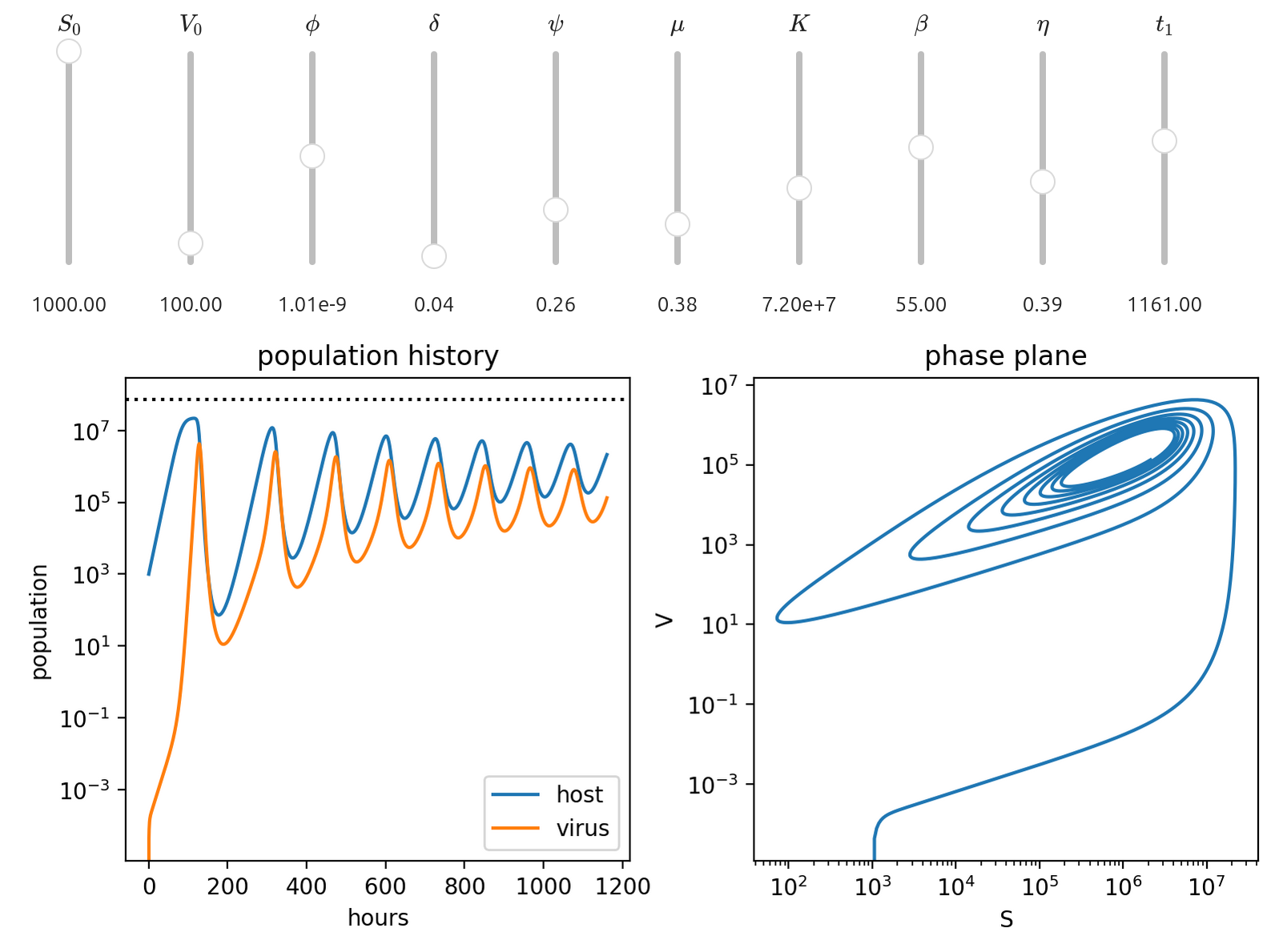
  • Exploring the model with interactive controls in Jupyter
Describing a model

We are going to look at the population dynamics of viruses and their hosts. To start with, we're going to use a model that is much simpler than what you'd typically find in epidemiology. In this model, every infection immediately kills the host and releases a burst of new virions. This is basically the Lotka-Volterra predator-prey model, modified to include add a carrying capacity instead of allowing the host to grow exponentially. Where \(S\) is the population of susceptible hosts (cells per milliliter) and \(V\) is the population of viruses (virions per milliliter), we get the following model :

\[\frac{dS}{dt} = \underbrace{\mu S \left[ 1 - \frac{S}{K}\right]}_{\text{logistical growth}} - \underbrace{ \vphantom{\left(\frac{S}{K}\right)} \psi S }_{\text{natural death}} - \underbrace{ \vphantom{\left(\frac{S}{K}\right)} \phi S V }_{\text{lysis}} \]
\[\frac{dV}{dt} = \underbrace{ \beta \phi S V }_{\text{release}} - \underbrace{ \vphantom{\beta} \delta V }_{\text{decay}} \]

Variables

  • \(S\) : host population
  • \(V\) : virion population

Parameters

  • \(\phi\) : viral infection rate (\(\frac{\text{mL}}{\text{hour} \times \text{cells}}\))
  • \(\delta\) : viral decay rate (\(\text{hour}^{-1}\))
  • \(\psi\) : host mortality (\(\text{hour}^{-1}\))
  • \(\mu\) : host growth rate (\(\text{hour}^{-1}\))
  • \(K\) : carrying capacity (\(\text{cells} \times \text{mL}^{-1}\))
  • \(\beta\) : virion production by lysis (\(\text{virions} \times \text{cell}^{-1}\) )

Initial conditions

  • \(S_0\) : initial host population
  • \(V_0\) : initial virion population
  • \(t_0\) : start time
  • \(t_1\) : end time

This is the definition of our model. If you like, it is possible to solve it analytically, particularly for boundary cases. For example, if you start without any viruses by setting \(V_0=0\), or you start with the host population already at carrying capacity \(S_0=K\), you can learn discover the important features of the model just with pencil and paper. But, if we dive into that topic, this will become a math class. So, let's build it our model in Python. We'll start by importing our modules.

Expressing the model in Python
import matplotlib.pyplot as plt
import numpy as np, exp
from scipy.integrate import solve_ivp

Next, let's express the SV model as a Python function. This function must be constructed in the following way :

  • It must have at least two arguments (f(t, y))
  • The first argument (t) is the independent variable, and must be a scalar
  • The second argument (y) must be an array of the dependent variables
  • It must must return an array of the same shape as y

There are two ways to pass your parameters into this function. The easy way is to just define them in the calling scope, like so :

# model
a = 12.345
def f( t, y ) :
   return a * y

This is fine if you are just tinkering around, but I encourage you to think of this as a "naughty" practice. Especially in a notebook environment, it's very easy to set a variable and then forget about it when you re-write the code cell. The notebook kernel remembers the value you set even if you delete the code cell that set the parameter. It can be very confusing to debug.

It's better practice to set parameters as arguments after y, like so :

# model
def f( t, y, a ) :
    return a * y

The order of the parameters after y is important! They will be passed into the model function by solve_ivp from a list.

In our case, time dependence is only on the left side of the system equations, and so t is not used in the function itself. The SV system looks like this :

# model
def SV( t, y, phi, delta, psi, mu, K, beta ) :
   s, v = y
   ds = mu * s * ( 1 - s/K ) - psi * s - phi * s * v
   dv = beta * phi * s * v - delta * v

   return ( ds, dv )
Model parameters and boundary conditions

Now, we need to choose some values for our parameters, initial conditions, and discretize our independent variable. These values were selected by David for his workshop.

# model parameters
phi   = 6e-10  # viral infection rate
delta = 1/24   # viral decay rate
psi   = 1/4    # host mortality
mu    = 0.95   # host growth rate
K     = 7.5e7  # carrying capacity
beta  = 50     # virion burst size

# initial conditions
t0 = 0    # initial time
t1 = 1680 # one academic quarter
s0 = 1000 # initial host population
v0 = 1000 # initial virus population

# solution domain
t_eval = np.arange( t0, t1, 0.01 )
Solving the model by numerical integration

That's all the setup done, so let's solve the system. The solve_ivp function takes three positional arguments : the model function, the initial and ending value of the independent variable, and an array of the initial values for the system variables. The initial values should be in the same order they appear in the model function.

If you are passing your parameters in explicitly (as I recommend), the args argument takes a list, tuple or array with the parameters in the same order they appear in the model function. You can let the solver chop up the interval for the independent variable itself, but I suggest you also pass in the values you want with t_eval.

Last of all, you can select the integration approach using the method argument. The documentation lists the options, but the default is RK45, one of the Runge-Kutta methods. You may have learned a version of it in high school calculus, where you cut the function into half-trapezoid strips to add up the area under the curve. Probably, the default will be fine for most applications.

# solution
sol = solve_ivp( SV, 
    [t0, t1],
    [s0, v0],
    args=( phi, delta, psi, mu, K, beta ),
    t_eval=t_eval,
    method='RK45' )

The solution object has a bunch of interesting stuff in it, but we're mostly interested in t and y.

message: The solver successfully reached the end of the integration interval.
success: True
status: 0
        t: [ 0.000e+00  1.000e-02 ...  1.680e+03  1.680e+03]
        y: [[ 1.000e+03  1.007e+03 ...  1.412e+06  1.412e+06]
            [ 1.000e+03  9.996e+02 ...  1.135e+09  1.135e+09]]
    sol: None
t_events: None
y_events: None
    nfev: 1596
    njev: 26
    nlu: 26

If you want to find roots, or parts of the phase plane where other conditions are satisfied, you can define them as functions and pass them to solve_ivp using the events argument, and the solutions will be in t_events or y_events. It's a very powerful and flexible interface! See the documentation for more about that.

Plotting the model

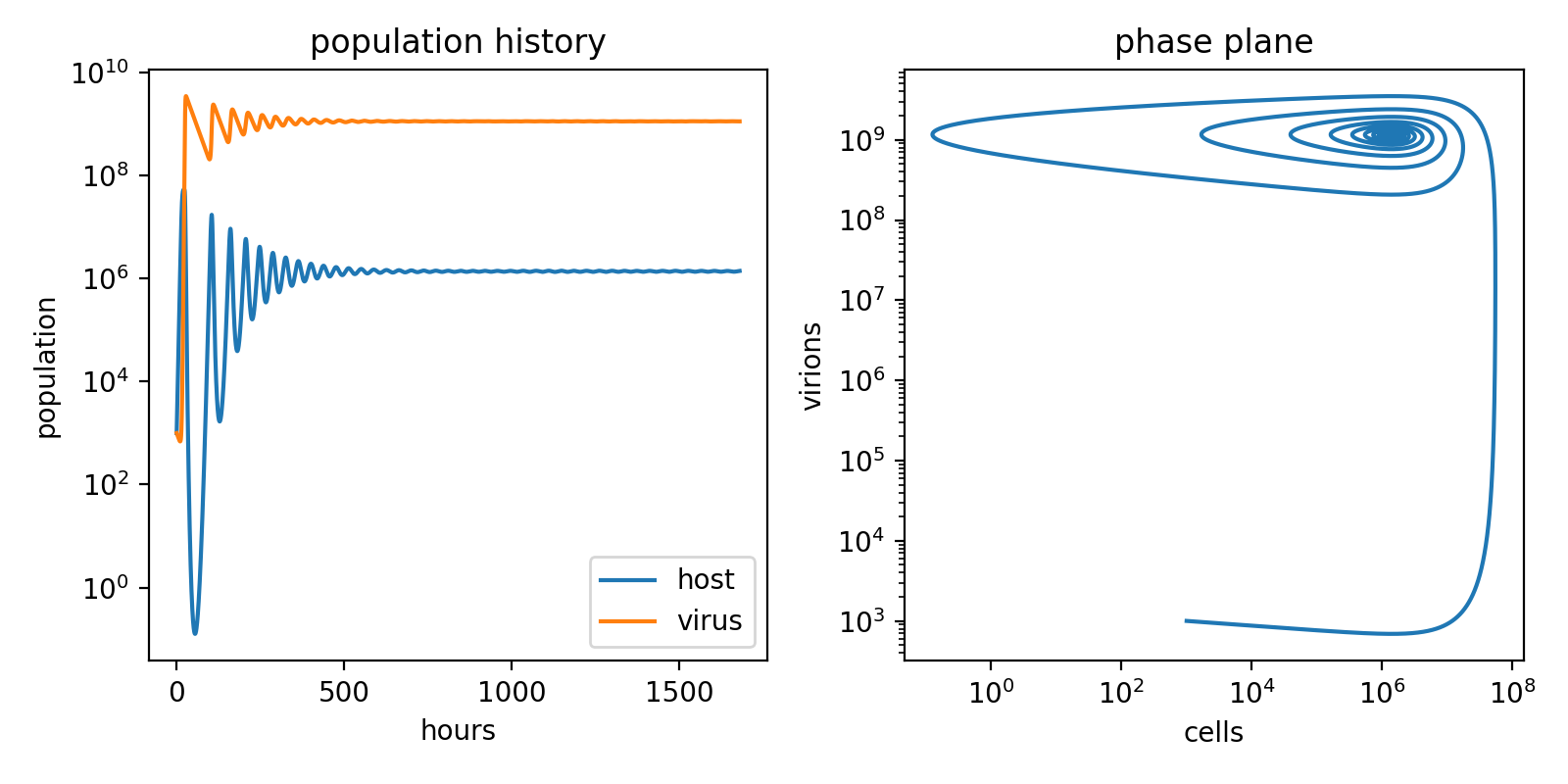
Let's make two plots. The first will show the \(S(t)\) and \(V(t)\) by plotting y[0] and y[1] verses t. This is the time evolution of the system. In the second, we'll show a parametric plot of \(x=S(t)\) and \(y=V(t)\). This is the phase plane of system.

plt.figure(figsize = (8, 4))
plt.subplot(121)
plt.plot(sol.t, sol.y[0], label='host')
plt.plot(sol.t, sol.y[1], label='virus')
plt.title( 'population history' )
plt.semilogy()
plt.xlabel('hours')
plt.ylabel('population')
plt.legend()
plt.subplot(122)
plt.plot(sol.y[0], sol.y[1] )
plt.title( 'phase plane' )
plt.loglog()
plt.xlabel('cells')
plt.ylabel('virions')
plt.tight_layout()

SV model

OK! It looks like everything works! I happened to choose parameters that put the system into an interesting state.

Expanding the model

I find that it's really helpful to compare and contrast two similar applications of a tool to really understand how it works. So, let's expand our model a little bit. Instead of treating infection and lysis as an instantaneous event, let's add a new variable to the system to represent infected cells. In this model, there's no recovery, so infection always results in lysis. Both susceptible and infected cells can also die "normally."

\[\frac{dS}{dt} = \mu S\left( 1 - \frac{S+I}{K}\right) - \psi S -\phi S V \]
\[\frac{dI}{dt} = \phi S V - \eta I - \psi I \]
\[\frac{dV}{dt} = \eta \beta I - \delta V - \phi S V\]

The system now has three differential equations, one new variable \(I\) to represent infected cells, and one new parameter \(\eta\) to represent the what fraction of infected cells lyse per hour. We've also got one more initial condition \(I_0\) for the number of infected cells to start out with.

Variables

  • \(S\) : susceptible host population
  • \(I\) : infected host population
  • \(V\) : virion population

Parameters

  • \(\phi\) : viral infection rate (\(\frac{\text{mL}}{\text{hour} \times \text{cells}}\))
  • \(\delta\) : viral decay rate (\(\text{hour}^{-1}\))
  • \(\psi\) : host mortality (\(\text{hour}^{-1}\))
  • \(\mu\) : host growth rate (\(\text{hour}^{-1}\))
  • \(K\) : carrying capacity (\(\text{cells} \times \text{mL}^{-1}\))
  • \(\beta\) : virion production by lysis (\(\text{virions} \times \text{cell}^{-1}\) )
  • \(\eta\) : lytic rate (\(\text{hour}^{-1}\))

Initial conditions

  • \(S_0\) : initial susceptible host population
  • \(I_0\) : initial infected host population
  • \(V_0\) : initial virion population
  • \(t_0\) : start time
  • \(t_1\) : end time

The model function has the same variable arguments t and y and one additional parameter, eta. However, y now has a length of three, corresponding to the three differential equations. The function must now also return three values.

# model
def SIV( t, y, phi, delta, psi, mu, K, beta, eta ) :
    s, i, v = y
    ds = mu  * s * ( 1 - (s+i)/K ) - psi * s - phi * s * v
    di = phi * s * v               - eta * i - psi * i
    dv = eta * beta * i - delta * v - phi * s * v

    return ( ds, di, dv )

We'll set the parameters like before, except this time we also have eta and i0. Note also that this time I'm starting the host population off at the carrying capacity \(K\).

# model parameters
phi   = 6.7e-10 # viral infection rate
delta = 1/24    # viral decay rate
psi   = 1/4     # host mortality rate
mu    = 0.95    # host growth rate
K     = 7.5e7   # carrying capacity
eta   = 0.5     # lytic rate
beta  = 50      # burst size

# initial conditions
t0 = 0
t1 = 1680 # one academic quarter
s0 = K
v0 = 100
i0 = 0

# solution domain
t_eval = np.arange( t0, t1, 0.01 )

To solve, we also have to start the simulation with the initial values for \(I\) as i0 and pass the parameter eta to the model function.

# solution
sol = solve_ivp( SIV, 
                [t0, t1],
                [s0,i0,v0],
                args=( phi, delta, psi, mu, K, beta, eta ),
                t_eval=t_eval,
                method='RK45' )

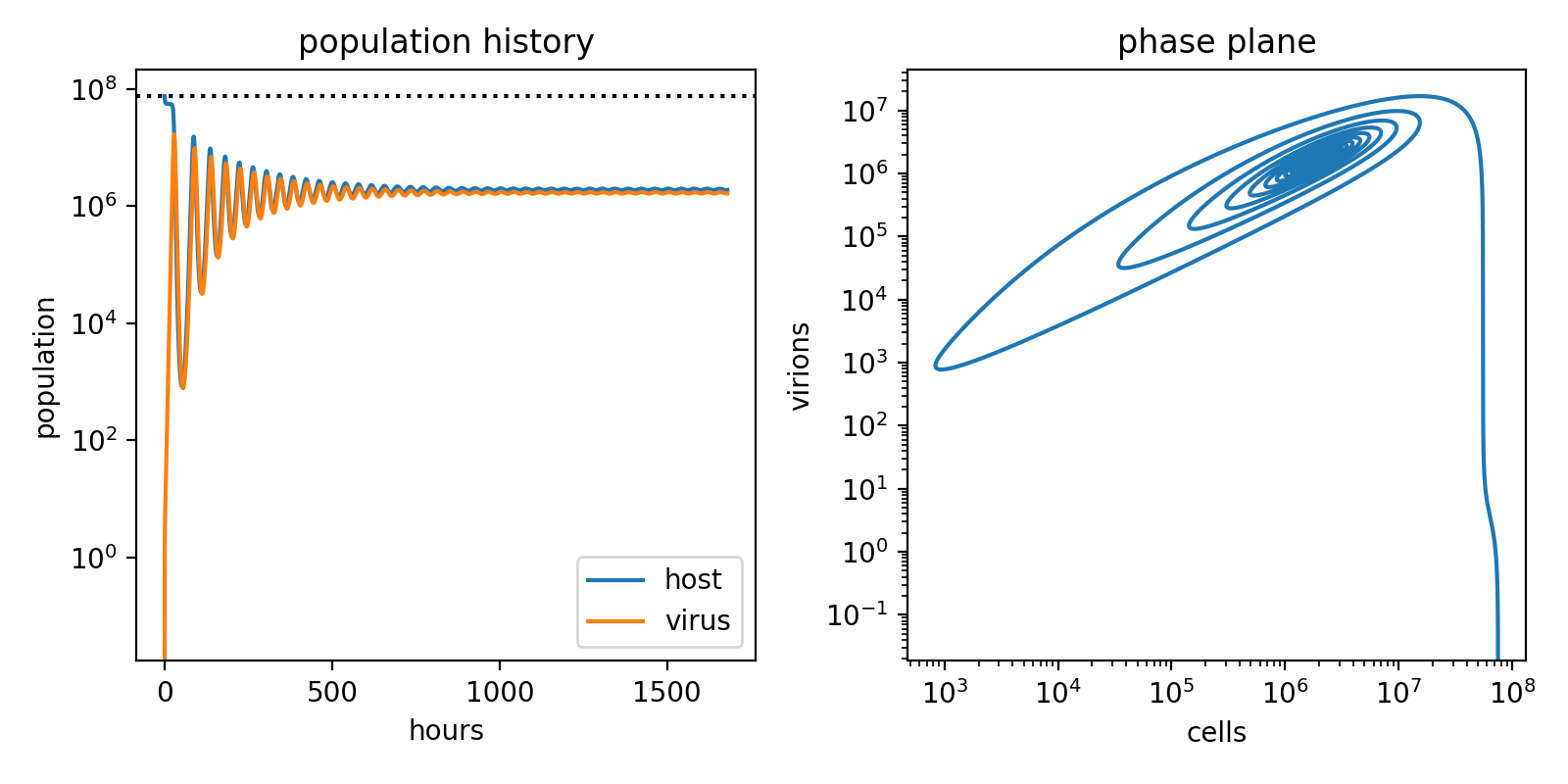
Now, we plot like before. This time, let's also add a dashed line so we can see what the system carrying capacity is.

plt.figure(figsize = (8, 4))
plt.subplot(121)
plt.plot(sol.t, sol.y[0], label='host')
plt.plot(sol.t, sol.y[1], label='virus')
plt.axhline( K, color='black', linestyle=':' )
plt.title( 'population history' )
plt.semilogy()
plt.xlabel('hours')
plt.ylabel('population')
plt.legend()
plt.subplot(122)
plt.plot(sol.y[0], sol.y[1] )
plt.title( 'phase plane' )
plt.loglog()
plt.xlabel('cells')
plt.ylabel('virions')
plt.tight_layout()

SIV model

Let's have a look at \(R_0\), the basic reproduction number. \(R_0\) is the expected number of new infections generated by each infection. In a real epidemic it would usually be estimated by observation to infer the other parameters. However, in our model, we can work it out algebraically from the parameters :

\[R_0 = \beta \frac{\eta}{\eta+\psi} \frac{\phi S^*}{\phi S^* + \delta}\]

where \(S^* = K \frac{\mu - \psi}{\mu}\). In order for a virus to spread, \(R_0\) must be greater than one. SARS-CoV-2 had an \(R_0\) of around 2.9 at the beginning of the outbreak, and then climbed to more than 9 as the virus adapted to reproduction in humans. Measles has an \(R_0\) somewhere around 12 to 18, which makes it an absolute monster. However, if a virus's \(R_0\) can be pushed below 1 for a sustained period, it can be driven to complete extinction, as was accomplished with Smallpox in 1980.

Let's use \(R_0\) to help pick some new model parameters. We'll make a function that takes all of our parameters as defaults from the calling context, like so :

def R0( phi=phi, delta=delta, psi=psi, beta=beta, eta=eta ) :
    S = K * ( ( mu - psi ) / mu )
    return beta * ( eta / ( eta + psi ) ) * ( ( phi * S ) / ( phi * S + delta ) )

Now, we can conveniently calculate how \(R_0\) responds to varying any of the model parameters. As long as the parameters we just used are still in the calling context, we can do this :

B = range( 1, 100 )
R = [ R0(beta=b) for b in B ]

plt.plot( B, R )
plt.axhline( 1.0, linestyle=':' )
plt.xlabel( r'$\beta$' )
plt.ylabel( r'$R_0$' )

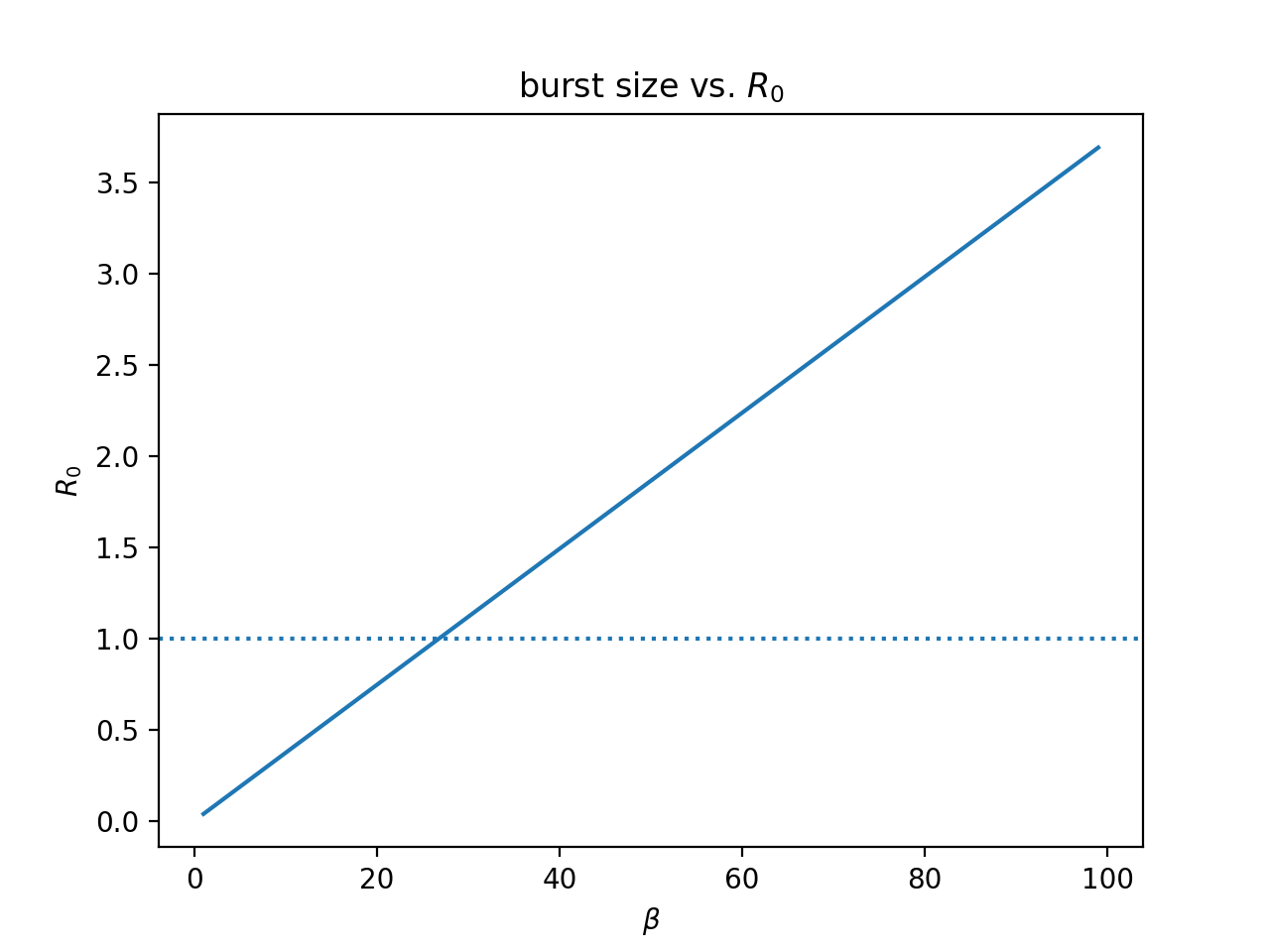
R0 vs beta

It looks like the threshold for \(\beta\) that gives us \(R_0>1\) is about 25. Let's nail that down more precisely with fsolve :

from scipy.optimize import fsolve

fsolve( lambda b : R0( beta=b ) - 1, [0,100] )
array([26.81982942, 26.81982942])

If we re-run the numerical solution with \(\beta = 26.81982942\), the model is poised right at the critical threshold. Looking at the population plots, the virus doesn't appear to be growing, but isn't going extinct either, hovering at less than one virion per milliliter of culture. However, if we look at the phase plane, it looks like the virus is indeed heading very slowly toward extinction.

SIV model at critical R0

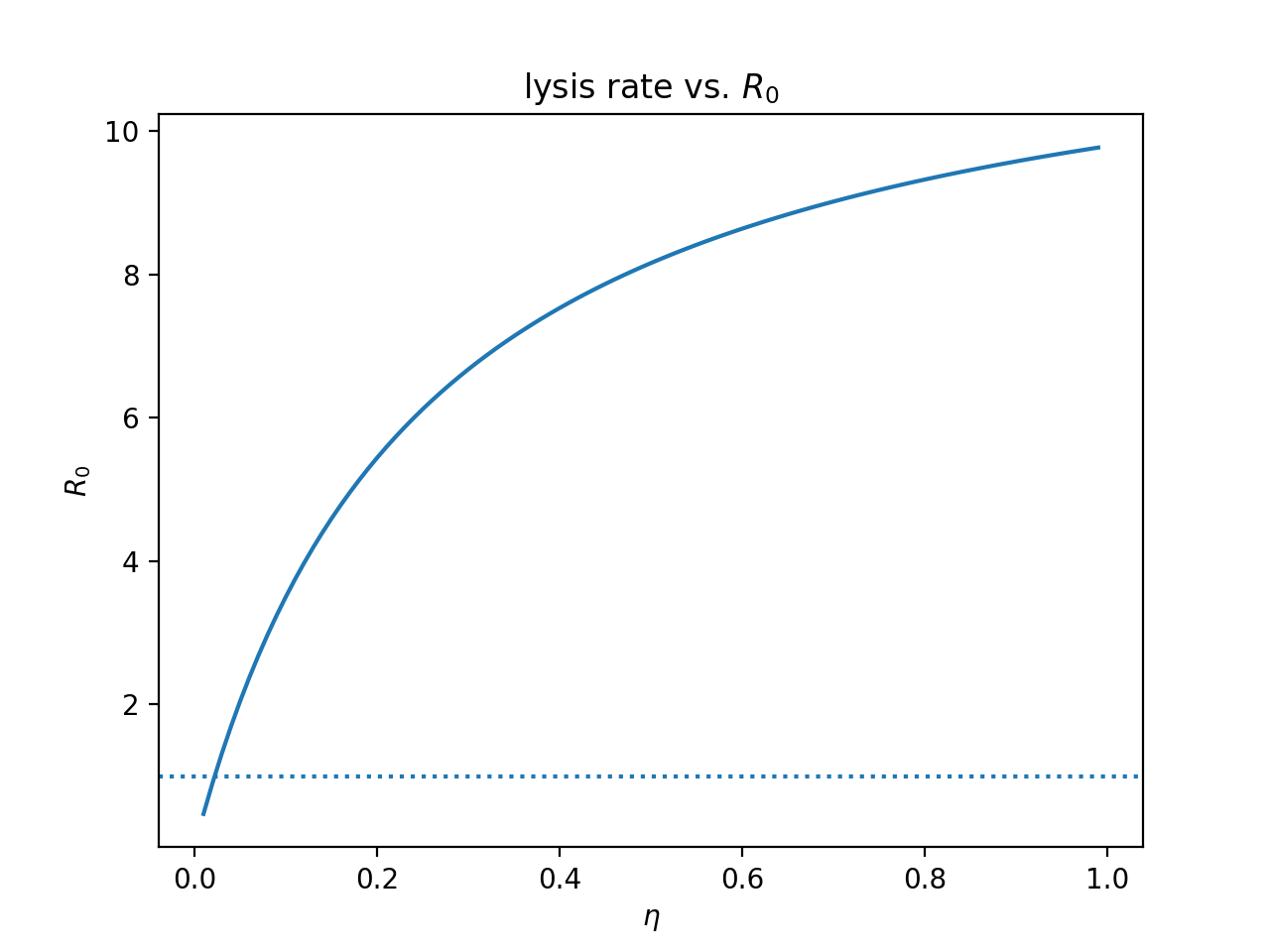
Let's try this for \(\eta\), the lysis rate, which is inversely proportional to the incubation period.

E = np.arange( 0.01, 1.0, 0.01 )
R = [ R0(eta=e) for e in E ]

plt.plot( E, R )
plt.axhline( 1.0, linestyle=':' )
plt.xlabel( r'$\eta$' )
plt.ylabel( r'$R_0$' )

R0 vs lysis rate

This time, we have a nonlinear relationship between \(\eta\) and \(R_0\), but we can still find the critical value the same way :

fsolve( lambda e : R0( eta=e ) - 1, [0,1.0] )
array([0.5504814, 0.5504814])
Interactive exploration in Jupyter

It's very easy to try out different model parameters this way, but it's still a little bit cumbersome to explore the parameter space. Fortunately, there is a set of interactive browser controls called Jupyter Widgets. This makes it possible to connect our parameters to widgets like buttons, sliders, selection boxes and checkboxes, and then re-run our model and replot the results when you adjust a parameter. The model runs fast enough on modern computers that this can produce a live view of the results as you drag the slider back and forth! It's a very powerful way to gain an intuitive understanding of how each parameter affects the model and how they interact.

To use Jupyter Widgets, make sure the package ipywidgets is installed (the Jupyter project used to be called IPython, if you're wondering what's up with the name). Then import some things from it :

from ipywidgets import interactive, widgets, Layout, HBox, VBox

Then, we just take the model code we've been using, and wrap it in a function that runs the model and makes the plots :

def makeplot( s0, v0, phi, delta, psi, mu, K, beta, eta, t1 ) :

    # model
    def SIV( t, y, phi, delta, psi, mu, K, beta, eta ) :
        s, i, v = y
        ds = mu  * s * ( 1 - (s+i)/K ) - psi * s - phi * s * v
        di = phi * s * v               - eta * i - psi * i
        dv = eta * beta * i - delta * v - phi * s * v

        return ( ds, di, dv )

    # solution domain
    t_eval = np.arange( t0, t1, 1.0 )

    # solution
    sol = solve_ivp( SIV, 
                    [t0, t1],
                    [s0,i0,v0],
                    args=( phi, delta, psi, mu, K, beta, eta ),
                    t_eval=t_eval,
                    method='LSODA' )

    plt.figure(figsize = (8, 4))
    plt.subplot(121)
    plt.plot(sol.t, sol.y[0], label='host')
    plt.plot(sol.t, sol.y[1], label='virus')
    plt.axhline( K, color='black', linestyle=':' )
    plt.title( 'population history' )
    plt.semilogy()
    plt.xlabel('hours')
    plt.ylabel('population')
    plt.legend()
    plt.subplot(122)
    plt.plot(sol.y[0], sol.y[1] )
    plt.title( 'phase plane' )
    plt.loglog()
    plt.xlabel('S')
    plt.ylabel('V')
    plt.tight_layout()

There are somewhat simpler ways to use Jupyter Widgets that dispense with some of the code I'm about to show you, but we have a lot of sensitive parameters. Usually, I think you will want to explicitly set the starting values and the ranges of each parameter. So, for each parameter we want to play with, we create a FloatSlider object configured with the default values, minimums and maximums. For parameters like \(K\) and \(\phi\) which will tend to have very large or very small values, we also set readout_format to display the number in scientific notation.

# model parameters
phi_0   = 6.7e-10 # viral infection rate
delta_0 = 1/24    # viral decay rate
psi_0   = 1/4     # host mortality rate
mu_0    = 0.95    # host growth rate
K_0     = 7.5e7   # carrying capacity
eta_0   = 0.5     # lytic rate
beta_0  = 50      # burst size

# initial conditions
t0 = 0
t1_0 = 1680 # one academic quarter
s0 = K
v0 = 100
i0 = 0

v0_w    = widgets.FloatSlider( min=0, max=1000, step=1, value=v0,
                            orientation='vertical', description=r'$V_0$' )
s0_w    = widgets.FloatSlider( min=1, max=1000, step=1, value=s0,
                            orientation='vertical', description=r'$S_0$' )
phi_w   = widgets.FloatSlider( min=0, max=2e-9, step=1e-12, value=phi_0,
                            orientation='vertical', description=r'$\phi$',
                            readout_format='.2e' )
delta_w = widgets.FloatSlider( min=0, max=1, step=0.01, value=delta_0,
                            orientation='vertical', description=r'$\delta$' )
psi_w   = widgets.FloatSlider( min=0, max=1, step=0.01, value=psi_0,
                            orientation='vertical', description=r'$\psi$' )
K_w     = widgets.FloatSlider( min=0, max=2e8, step=0.01, value=K_0,
                            orientation='vertical', description=r'$K$',
                            readout_format='.2e' )
mu_w    = widgets.FloatSlider( min=0, max=2, step=0.01, value=mu_0,
                            orientation='vertical', description=r'$\mu$' )
beta_w  = widgets.FloatSlider( min=0, max=100, step=1, value=beta_0,
                            orientation='vertical', description=r'$\beta$' )
eta_w   = widgets.FloatSlider( min=0.0, max=1.0, step=0.01, value=eta_0,
                            orientation='vertical', description=r'$\eta$' )
t1_w    = widgets.FloatSlider( min=1, max=2000, step=1, value=t1_0,
                            orientation='vertical', description=r'$t_1$' )

Next, we build the interactive widget by binding each FloatSlider to its corresponding parameter in the function that wraps our modeling and plotting code :

widget = interactive( makeplot,
                    v0=v0_w,
                    s0=s0_w,
                    phi=phi_w,
                    delta=delta_w,
                    psi=psi_w,
                    mu=mu_w,
                    K=K_w,
                    beta=beta_w,
                    eta=eta_w,
                    t1=t1_w )

This would actually be enough! If you call interactive() directly, Jupyter will display the results just fine. The problem is that the layout of the FloatSlider widgets will be ugly. So, let's wrap the controls in an HBox with a flow wrap layout. This way, each control will be added left to right, the same way that letters flow in English text. Then, we wrap the HBox with our controls and the plot output in a VBox so they'll be stacked nicely on top of each other.

controls = HBox( widget.children[:-1],
                 layout = Layout( flex_flow = 'row wrap' ) )
output = widget.children[-1]
display( VBox( [ controls, output ] ) )

Now, we can play around with the sliders, and the model will automatically run and update the plot! It does not take very long to quickly develop a sense for what role each parameter plays in the system when you can see the results immediately.

SIV interactive widgets

The numerical integration methods are extremely good at fitting smooth curves, so it isn't necessary to use extremely fine discretization to get reasonably accurate results. I found that it is possible to use a very coarse step size to get essentially instant live feedback!

Once again, I'd like to thank David for coming to visit us, and for taking the time to put together this fantastic workshop just for us.

Phylogenetics in the microbiome with SuchLinkedTrees

Article available as a Jupyter Notebook: SuchTree_2.ipynb

In the last article, we saw how to use SuchTree to probe the topology of very large trees. In this article, we're going to look at the other component of the package, SuchLinkedTrees.

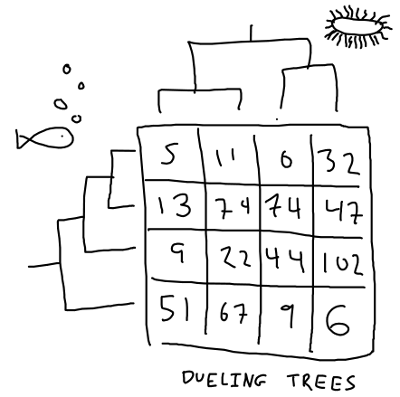
If you are interested in studying how two groups of organisms interact (or, rather, have interacted over evolutionary time), you will find yourself with two trees of distinct groups of taxa that are linked by a matrix of interaction observations. This is sometimes called a 'dueling trees' problem.

dueling trees

If the trees happen to have the same number of taxa, and the interaction matrix happens to be a unit matrix, then you can compute the distance matrix for each of your trees and use the Mantel test to compare them. However, this is a pretty special case. Hommola et al. describe a method extends the Mantel test in this paper here :

This is implemented in scikit-bio as hommola_cospeciation. Unfortunately, the version in scikit-bio does not scale to very large trees, and does not expose the computed distances for analysis. This is where SuchLinkedTrees can help.

Analysis of giant phylogenetic trees with SuchTree

Article available as a Jupyter Notebook: SuchTree_1.ipynb

There are a lot of packages for working with and manipulating phylogenetic trees using python. Rather than compete with packages like dendropy and ete3 on the basis of features, SuchTree does one thing well -- its memory usage and algorithmic complexity scale linearly with the number of taxa in your tree. If you need to work with very large trees, this is very helpful.

Let's have a look at some useful things you can do with trees using the SuchTree class. First, let's get our modules loaded.

To run this notebook on an Ubuntu host, you will need the following system packages installed for ete3 to work :

  • python3-pyqt4.qtopengl
  • python3-pyqt5.qtopengl

and python packages :

  • SuchTree
  • pandas
  • cython
  • scipy
  • numpy
  • matplotlib
  • seaborn
  • fastcluster
  • dendropy
  • ete3

and obviously you'll want jupyter installed so you can run the notebook server. The Internet is full of opinions about how to set up your python environment. You should find one that works for you, but this guide is as good as any to get you started.

I'm going to start off by loading the required packages and suppressing some warnings that should be fixed in the next stable release of seaborn.

I'm going to assume that you are running this notebook out of a local copy of the SuchTree repository for any local file paths.

Computing as a liberal arts degree

I never really fit into any of the various educational programs I've attended. I've spent a lot of time thinking about what's wrong with them, because I know, of course, that there isn't anything wrong with me.

I see five big problems with higher education :

  • We draw too bright a line between "technical" and "non-technical" degrees
  • We design courses around departments instead of topics
  • We do a terrible job of integrating hands-on experience
  • We structure courses and evaluations in a strictly linear, pipeline-like way
  • We do an criminally bad job of caring for students' mental and emotional health

Biology students learn about cell culture and PCR, but they rarely have a chance to actually do these things. Computer science students learn about microprocessors, but never build one. Engineering and physics students learn about ballistics, but never actually get to try it in any meaningful way. Labs are always almost always afterthoughts, and connect poorly to the rest of the curriculum.

I would like to see at least a few colleges scrap the idea of traditional bachelors of science degree, and instead offer a liberal arts style degree focused on science and technology. I would like to see them mix in a heavy dose of practical trade-school style instruction. Get students into machine shops and out into the woods, and let them get their hands dirty. The spine of every kind of degree should be structured around history. Only history can lend any sort of coherent narrative to a big topic. Last of all, there absolutely must be some way of avoiding the classes-grades-classes-grades treadmill. The hectic academic schedule of classes and grades promotes toxic mix of self-loathing and narcissism and severely punishes any sort of reflection. There are better, easier ways of organizing instruction and evaluating students.

This is my curriculum for a liberal arts degree in technology and computing. Someone with this degree would be prepared to begin a masters degree in an engineering or technical field, but it is not intended to provide any sort of "workplace" training (although it doesn't discourage it). It would also serve as a strong base from which to purse a Ph.D. in a wide variety of topics, and would better prepare students to operate as independent researchers. In that sense, it's a liberal arts degree, not a bachelors of science. Personally, I think this would be vastly superior to any existing undergraduate science or engineering degree, both for people who go on to pursue advanced degrees and people who do not. Really successful undergraduates wind up constructing an experience something like this for themselves. Everyone would be better served if we simply made it official.

Evaluations would be based on the student's portfolio. Each of the sixteen classes would be designed around the creation of tangible artifacts that would go into the portfolio. The quality and imagination of the artifacts would determine the grade for the unit, and would be set by a panel of faculty assembled for the review. Faculty reviews of each portfolio would be archived and made available to the student. Artifacts may be replaced by the student at any time and the portfolio resubmitted for evaluation. Graduation occurs upon a positive evaluation of a complete portfolio.

The curriculum might take a bit longer than four years to complete. I would address this by offering admission to students around sixteen or seventeen years old, and select faculty with the necessary skills for mentoring adolescents. Regardless of age, the admissions process would include a formal psychological evaluation to establish the emotional preparedness of the student to engage in the program. I would would also include mandatory counseling for all students throughout the program; student who are doing emotionally well would use it as career counseling and to help them grapple with their intellectual and aesthetic priorities.

I would also encourage students to take vacations and breaks, and advise and organize these breaks through the counseling services. For struggling students, these would be no-fault opportunities to collect themselves and address personal issues. For others, they would be opportunities for internships, travel and other projects. Organizing evaluations around student portfolios would benefit both struggling and excelling students; breaks in instruction could be used to shore up specific weak spots, or to create artifacts of superlative quality.

The portfolio structure would also make it less risky to include younger students. If it is determined that a student is not emotionally prepared for college, he or she can be placed into an associated high school but continue attending the program part-time, and then re-join as a full time student once they graduate from high school. The portfolio structure would also prevent young students from rushing through the program without reaching the appropriate level of emotional and intellectual maturity deemed necessary by the faculty. It would provide a fair mechanism for the faculty to push precocious students to direct their efforts at achieving quality rather than speed.

I've also included a few topics and activities that most university programs would probably deem inappropriate, particularly related to weapons and warfare. I've done this because I think too many engineers and scientists fail to truly appreciate the destructive aspects of technology and do not develop a mature understanding of how their work is used. There is simply no getting around the fact that much of our technology is directly connected to the business of fighting and killing.

To address this, the program would require students to build, use and study weapons and their uses. This would include using stone tools to make spears, and then learning how to hunt with them, using basic metalworking to build simple firearms, and then conducting target practice on a ballistics range, and building vehicles such as sailboats and drones and using them to conduct mock battles. The scenarios would be designed to evoke questions about history and ethics, and the coursework would include studies on those topics. To make this work, the faculty would need to include military historians. This is an aspect that is totally missing from extant engineering and science curricula.

Freshman Year : Origins

History 1, Origins of Computing : A review of counting systems from different cultures, how "everyday" mathematics was actually carried out by ordinary people in ancient Greece, Rome and China. A review of early record keeping and writing technologies from Cuneiform to punch cards.

Literature 1, Origins of the Written Word : A review of the historical and linguistic development of early writing systems and technologies from each continent.

Theory 1, Foundations of Logic and Philosophy : Deductive and inductive reasoning in mathematics and rhetoric, with applications to geometry, number theory and argument.

Practicum 1, Mathematics, Writing Systems and Technologies of the Ancient World : Students will learn and perform the basics of many of the key technologies of the ancient world :

  • Stone toolmaking
  • Working bronze and copper
  • Ironworking and steel toolmaking
  • Writing in clay, papyrus, stone, wood and metal
  • Jeweling
  • Weaving
  • Weapons
  • Glass blowing
  • Ceramics

During freshman year, all transactions with the university will be carried out using contract devices of the ancient world. Meal plans will be tabulated with tally sticks, tuition and aid and Work Study with Cuneiform in clay, and books supplies and sundries using abacus and ancient Chinese coinage.

Sophomore Year : Empiricism

History 2, Birth of Computing : The invention, use and theory of the Jacquard loom. Charles Babbage and the first mechanical computers. Ada Lovelace and the concept of stored programs. Use of early mechanical computing in industry, navigation, civil society and warfare. Galileo, Newton and Darwin and the birth of Empiricism.

Literature 2, The Spread of the Written Word : The origin of modern writing systems, scripts, materials and technologies. The scroll, the codex and the library; the printing press and the Gutenberg Bible; movable type, the Enlightenment and the American and French revolutions; the cryptographic systems of the Napoleonic Wars; the development of scientific reasoning in the Enlightenment and before.

Theory 2, Foundations of Algebraic Reasoning and Empiricism : Set theory and the synthesis of algebraic systems, with applications to algebra, calculus and physics. Physics will emphasize thermodynamics, and treat kinetics and mechanics in the context of heat engines. Introduction to empirical reasoning and with emphasis on the design of controlled experiments.

Practicum 2, The Technologies of the Early Modern Age : Students will construct and and operate the technologies of the early modern age :

  • Casting type and printing
  • Drafting and technical drawing
  • Machining in steel and brass
  • Making and breaking early cryptographic systems
  • Mechanized textile manufacturing
  • Techniques of mass production
  • Printing at large scales
  • Theory, construction and operation of steam engines
  • Firearms
  • Sail power

Students will transact their business with university using double entry ledgers.

Junior Year : Science & Engineering

History 3, The Science of the Three World Wars : The impact of steam power on naval and land battles of World War I; the birth of aviation; The Manhattan Project; the cracking of Enigma and Purple; the first modern computers and their uses; the computing of the Apollo Project; balistic missiles and space exploration; the Soviet computer industry; the invention of transistor and the integrated circuit; the Age of Moore's Law; the United States v. Microsoft Corporation; Linux and the Free Software movement.

Literature 3, Science Fiction and Fact : A review of the science fiction of the 19th, 20th and 21st centuries; case studies on the works of Jules Verne, Issac Asimov and William Gibson. A review of popular science literature and science journalism; Thomas Huxley, Issac Asimov, Carl Sagan. An introduction to the scientific literature; the case of Newton vs. Leibniz, Einstein's 1905 papers, Watson & Crick and Roseland Franklin; modern controversies in the literature. Seminars on research methods and archival practices.

Theory 3, The Language of Computing : The Turing and von Neumann concepts; the principles of computer languages; algorithms and data structures; numerical methods in mathematics and physics; statistics, statistical mechanics and quantum mechanics.

Practicum 3, Modern Computing Technologies : Students will construct and operate a selection of key contemporary technologies, with an emphasis on computing :

  • Lasers, optics and radio
  • Imaging
  • Microprocessor design
  • Mechanized and digital typesetting technologies
  • Semiconductor manufacturing
  • Computing languages
  • Building compilers and interpreters
  • Device drivers
  • Networking
  • Digital signal processing
  • Operating systems internals
  • Real time computing
  • Industrial design and CAD/CAM

Students will transact their business with the university using networking technologies. The university will provide a machine readable interfaces to services, and the students must construct their own software solutions to interact with them.

Senior Year : Here & Now

History 4, Contemporary Issues in Science, Technology and Society : Climate change; poverty and development economics; alternative pathways for economic development; medicine and disease; renewable energy.

Literature 4, Communicating in Writing, Speech and Art : Practical instruction on rhetoric, writing style and visual design.

Theory 4, Topics in Science and Engineering : Focused seminars on technical topics to support Practicum 4.

Practicum 4, Capstone Project : Students will work individually or in small teams with faculty mentors on projects of their own design.

The university will endeavor to minimize direct administrative contact with students during senior year, and instead mediate through their faculty mentors.

Why doesn't your lab have a 3D printer yet?

Electrophoresis setups are like Tupperware. You can never find the right lid when you need it, and someone always seems to be borrowing the doohicky you need.

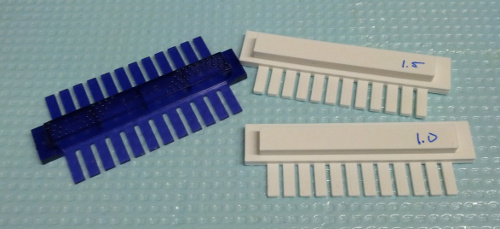
Here in the Eisen Lab, it turns out we've been using Marc Facciotti's electrophoresis stuff for years. He keeps his stuff organized, and, well... that's not been our strong suit lately. John, our lab manager, has been gently but inexorably herding us towards a semblance of respectability in our lab behavior. As part of this, he decided that it was time for us to get our electrophoresis stuff straightened out. So, he ordered a bunch nice of gel combs from one of our suppliers. They cost $51 each (see the "12 tooth double-sided comb", catalog number 669-B2-12, for the exact one pictured below). We bought six of them with different sizes and spacing, for a total exceeding $300.

While I appreciate that companies need to make money, this is a ridiculous price for a lousy little scrap of plastic. $300 for a couple of gel combs is cartel pricing, not market pricing. Fortunately, we happen to have a very nice 3D printer. It is very good at making little scraps of plastic. So, I busted out the calipers and tossed together some models of gel combs in OpenSCAD. A few minutes of printing later, and the $51 gel combs are heading back to the store.

Original and 3D printed gel combs

Here's the code for the six well 1.5mm by 9mm comb :

f=0.01;
difference(){
  difference(){
    union(){
      cube( [ 80, 27, 3 ] );
      translate( [ 5.25, 14.3, f ] ) cube( [ 68, 9.3, 7.25 ] );
    }
    for ( i = [ 0:5 ] ) {
      translate( [ 17.1+i*11.0, -f, -f ] ) cube( [ 1.75, 12, 5 ] );
    }
  }
  union(){
    translate( [ -f,   -f, -f ] ) cube( [ 7,  12, 7] );
    translate( [ 73+f, -f, -f ] ) cube( [ 7,  12, 7] );
    translate( [ 0,    -f, 1.6] ) cube( [ 80, 12, 8] );
  }
}

Pretty easy to grasp, even if you've never seen SCAD before.

So, how much did this cost?

I ordered this plastic from ProtoParadigm at $42 for a kilogram. That's about four pennies a gram. Each of these gel combs cost about 21 cents to print. That's 1/243rd the price.

The 3D printer cost €1194.00 ($1524.62), which is less than the laptop I use for most of my work. The savings on just these gel combs has recuperated 18% of the cost of the printer.

It's also important that I was able to make some minor improvements to the design. The printed combs fit into the gel mold a bit better than the "official" ones. I also made separate combs for the 1.0mm and 1.5mm versions, and the labels are easier to read. If I wanted, tiny tweaks to my SCAD file would let me make all sorts of fun combinations of thicknesses and widths that aren't available from the manufacturer. So, these gel combs are not only \(\\frac{1}{243}\)'rd the price, but they are also better.

If you read the media hype about 3D printing, you will undoubtedly encounter a lot of fantastical-sounding speculation about how consumers will someday be able to print living goldfish, or computers, or bicycles. Maybe so. Maybe not. However, right now, you can print basic lab supplies and save a pile of money.

Buy your lab manager a little FDM printer and hook them up with some basic CAD training. Yes, the printer will probably mostly get used to make bottle openers and Tardis cookie cutters. So what? Your paper-printer, if you will excuse the retronym, mostly gets used for non-essential stuff too. I'd wager that for every important document printed in your lab, a hundred sheets have gone to Far Side cartoons and humorous notices taped up in the bathroom. It's a negligible expense compared to the benefits of having a machine that spits out documents when you really need them, and the social value of those the Far Side cartoons probably sums to a net positive anyway.

Conclusion : If you have a lab, and you don't have a 3D printer, you are wasting your money. Seriously.

In the time it took write this post, I printed $150 worth of gel combs, and it cost less than a cup of coffee.

Updates : Here is the tweet I originally posted about this article, before the URL for it vanishes into Twitter's memory hole. Here's an encouraging post from the Genome Web blog, and a nice article by Tim Dean at Australian Life Scientist. My article here seems to have spawned a thread on BioStar. Also, it made Ed Yong's Missing Links for November 24 over at Discover, and Megan Treacy did a really spiffy article over at Treehugger.

Many people have asked, and so I decided to see how well these kinds of 3D printed parts do in the autoclave. I tried it out with a couple of bad prints, and they seemed to hold up just fine after one or two cycles. Very thin parts did warp a bit, though, so I recommend printing parts you plan to autoclave nice and solid. Here is a before and after of a single-wall part (less than half a millimeter thick). I was expecting a puddle.